In the 2026 business economy, time is the most expensive commodity. For a small business, hiring a full-time assistant or a lead-gen specialist can be a massive financial burden. However, an AI agent built on n8n can handle the workload of three junior employees for the cost of a few API calls.
Unlike traditional bots, an AI Agent doesn’t just follow a script. It uses a Large Language Model (LLM) as its “brain” to determine which tools to use and which path to take to reach a goal. By the end of this guide, you will understand how to construct these agents from scratch, ensuring they are reliable, secure, and fully integrated into your existing business stack.
1. Why n8n is the “Gold Standard” for SMB AI Agents
Small businesses often struggle with the “Black Box” nature of many AI platforms. You want to know exactly how your data is being handled and why a certain decision was made. n8n provides this transparency through its visual workflow editor.
Control and Customization
In 2026, n8n’s LangChain nodes have become the industry favorite because they allow you to “chain” together different AI functions. You can connect a Google Gemini model for reasoning, a Pinecone vector store for long-term memory, and a Gmail node for execution—all on one screen. This is a level of modularity that was previously reserved for high-end enterprise software.
For those looking to scale, I always recommend checking out our latest AI news on how n8n’s self-hosted version is helping businesses maintain 100% data privacy—a crucial factor in 2026 compliance.
- Key Benefit: Open-source roots mean lower long-term costs and no vendor lock-in.
- Flexibility: You can “drop into code” (JavaScript or Python) whenever the visual nodes aren’t enough.
2. The Core Components of an n8n AI Agent
Before you drag your first node, you must understand the four pillars of an agentic workflow in n8n:
A. The Trigger (The “Ear”)
This is what wakes up your agent. It could be a new email in Gmail, a message in Slack, or even a scheduled “Cron” job that runs every morning at 9 AM to analyze your sales data.
B. The Brain (The LLM)
In 2026, we have a variety of “Brains” to choose from. For small businesses, OpenAI’s GPT-5 or Google’s Gemini 2.0 are the standard. You connect these using the “AI Agent” node in n8n, which acts as the central processor.
C. The Tools (The “Hands”)
An agent is useless if it can’t act. In n8n, “Tools” are other nodes you connect to the AI Agent node. For example, you might give your agent access to a Web Scraper tool, a Google Calendar tool, and a Stripe tool. The agent then “decides” which one to use based on the user’s request.
D. Memory (The “Experience”)
Standard AI “forgets” as soon as a conversation ends. In 2026, n8n agents use Window Buffer Memory or Vector Store Memory (like Qdrant) to remember past interactions. This ensures that if a customer asks a follow-up question two days later, the agent knows the context. This is the same level of sophistication we see in WearView vs VModel.AI, where “context” is king.
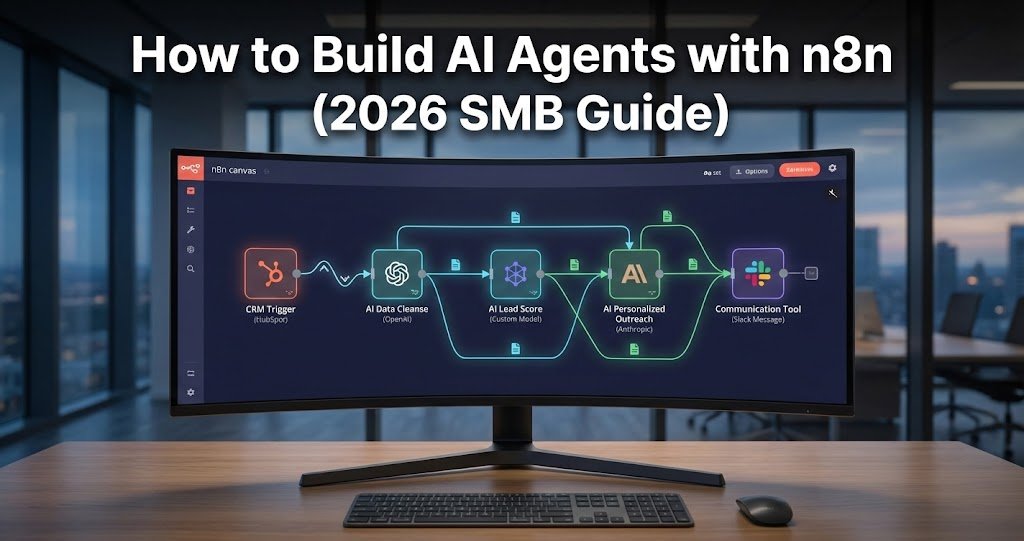
3. Step-by-Step: Building a Lead Qualification Agent
Let’s build a practical example: An agent that monitors your “Contact Us” form and automatically qualifies leads.
Step 1: Set up the Trigger
Add a Webhook node or a Google Sheets node (if your form saves to a sheet). This node captures the lead’s name, company, and message.
Step 2: The AI Agent Node
Connect an AI Agent node. Set the system prompt to: “You are a senior sales assistant. Analyze the incoming lead. Determine if they have a budget over $5,000 and if their problem matches our services. If they are a good fit, move them to ‘High Priority’. If not, send a polite referral email.”
Step 3: Adding the Tools
Attach a Google Search tool so the agent can research the lead’s company. Attach a HubSpot (or CRM) node so the agent can create a deal. Finally, attach a Gmail node so it can send the initial response.
Step 4: Testing and Refinement
Run the workflow with a “test” lead. Watch how the agent uses the search tool to find the company’s revenue and then decides whether to create a deal in HubSpot. If the agent’s tone feels off, you can use techniques from how to humanize AI text with WalterWrites to refine the system prompt for a more natural feel.
4. Advanced 2026 Strategy: Multi-Agent Systems
The biggest trend I’ve observed in 2026 is the shift from “One Big Agent” to a “Team of Small Agents.” In n8n, you can create a “Master Agent” that delegates tasks to specialized sub-workflows.
- Agent A (The Researcher): Scrapes the web and gathers data.
- Agent B (The Writer): Takes that data and drafts a report.
- Agent C (The Reviewer): Checks the report for errors (similar to how Proofademic AI checks for AI signatures).
This “Modular” approach is much more reliable and easier to debug than one giant, complex agent.
5. Comparative Performance: n8n vs. Zapier for AI Agents
| Feature | n8n (2026) | Zapier (2026) |
| Logic Type | Branching / Loop / Conditional | Mostly Linear |
| AI Integration | Native LangChain (Deep) | Simple OpenAI API (Surface) |
| Data Privacy | Self-hosting possible | Cloud-only |
| Cost | Fixed Subscription / Free Self-host | Credit-based (Expensive at scale) |
| Complexity | Intermediate (Steep learning curve) | Easy (Beginner-friendly) |
6. Sarah Miller’s Pro Tips for SMB Success
As a consultant, I’ve seen many businesses fail because they try to automate too much too fast. Here is my “Success Checklist” for 2026:
- Start with “Human-in-the-Loop”: Never let an agent send an email to a client without your approval during the first 30 days. Use n8n’s Wait for Webhook node to send yourself a Slack message with a “Approve/Reject” button.
- Monitor Your Tokens: AI agents can get expensive if they get stuck in a “thought loop.” Set up a Limit node in n8n to ensure the agent doesn’t run more than 5 steps for a single request.
- Document Your Prompts: Keep a library of your system prompts. As models (like GPT-5) update, you may need to tweak your instructions.
- Security First: Ensure your API keys are stored in n8n’s “Credentials” section, never hard-coded in a node. This is a basic rule I emphasize in How to use Arko.ai for fast architectural renders, where professional data must be protected.
7. The Final Verdict
For a small business in 2026, n8n isn’t just an automation tool; it’s an OS for your AI workforce. While it takes a few days to master the interface, the reward is a custom-built, private, and highly intelligent operation that runs 24/7. Whether you are automating your customer support like we see in WearView vs VModel.AI or managing a complex sales pipeline, n8n is the most powerful tool in your arsenal.
Top 5 Frequently Asked Questions
1. Is n8n difficult to learn for someone who isn’t a coder?
It has a learning curve, but you don’t need to be a software engineer. If you can understand a flowchart, you can use n8n. The community has thousands of pre-built AI tools and templates that you can import with one click.
2. How much does it cost to run n8n for a small business?
If you self-host (on a $10/month DigitalOcean droplet), n8n is essentially free. If you use their cloud version, it starts around $20/month. Your biggest cost will be the API calls to OpenAI or Anthropic, which for most SMBs is less than $50/month.
3. Can n8n agents handle phone calls?
Yes. In 2026, n8n integrates with Vapi and Twilio. You can build an agent that answers the phone, understands the caller’s intent using AI, and books an appointment in your Google Calendar automatically.
4. What happens if the AI agent makes a mistake?
This is why “Human-in-the-Loop” is vital. By setting up “Error Triggers,” n8n can detect when an AI response fails and immediately alert you via Slack or email so you can take over.
5. Can I use n8n to automate my social media content?
Absolutely. You can build an agent that monitors AI news, summarizes the day’s top stories, and generates a branded LinkedIn post using DALL-E 3 for the image—all without you lifting a finger.