By Harrison | Tech & Development Specialist at AI Creative Blog
Coding is 20% writing syntax and 80% banging your head against the wall trying to figure out why your script works on your machine but crashes in production. In 2026, AI hasn’t replaced programmers, but it has drastically changed how we handle that 80%.
If you are just typing “Write a Python script to scrape a website” into the chat box, you are using a Ferrari to drive to the mailbox. To get production-ready, clean, and secure code, you need engineered ChatGPT prompts for Python coding help.
This guide is not for people who want to cheat on their homework. It is for developers who want to ship faster. We will cover the “Chain of Thought” workflows that turn ChatGPT from a text generator into a Senior Python Architect.
The “Stack Overflow” Killer
The secret to great Python code from AI is Context Injection. Never paste an error message alone. The winning formula is: [Role Definition] + [Code Context] + [Specific Constraint] + [Desired Output].
- Example: “Act as a Senior Python Engineer. Review this Pandas dataframe snippet. Optimize it for memory usage, avoiding loops in favor of vectorization. Explain your logic using Big O notation.”
Phase 1: The “Senior Architect” Persona Setup
Before you ask for a single line of code, you need to set the environment. If you don’t, ChatGPT defaults to “generic tutorial mode,” giving you basic, inefficient code.
The System Prompt for Python
Paste this at the start of your chat to lock in the quality.
Copy This Prompt:“You are a Senior Python Backend Developer with 15 years of experience.Your priorities are:
- Security: Never suggest code with SQL injection or hardcoded API keys.
- Performance: Prioritize vectorization and generators over lists where possible.
- Standards: Follow PEP 8 guidelines strictly.
- Modernity: Use features from Python 3.12+ (like type hinting and f-strings).If I ask for a solution, provide the code first, then a brief explanation of the ‘Why’. Do you understand?”
Why this works: It forces the model to filter out outdated Python 2.7 habits or inefficient loops found in old training data.
If you are interested in how to structure prompts for other creative writing tasks, our guide on ChatGPT prompts for writing blog posts breaks down this “Persona Strategy” in even more detail.
Phase 2: Debugging Prompts (The “Rubber Duck” Method)
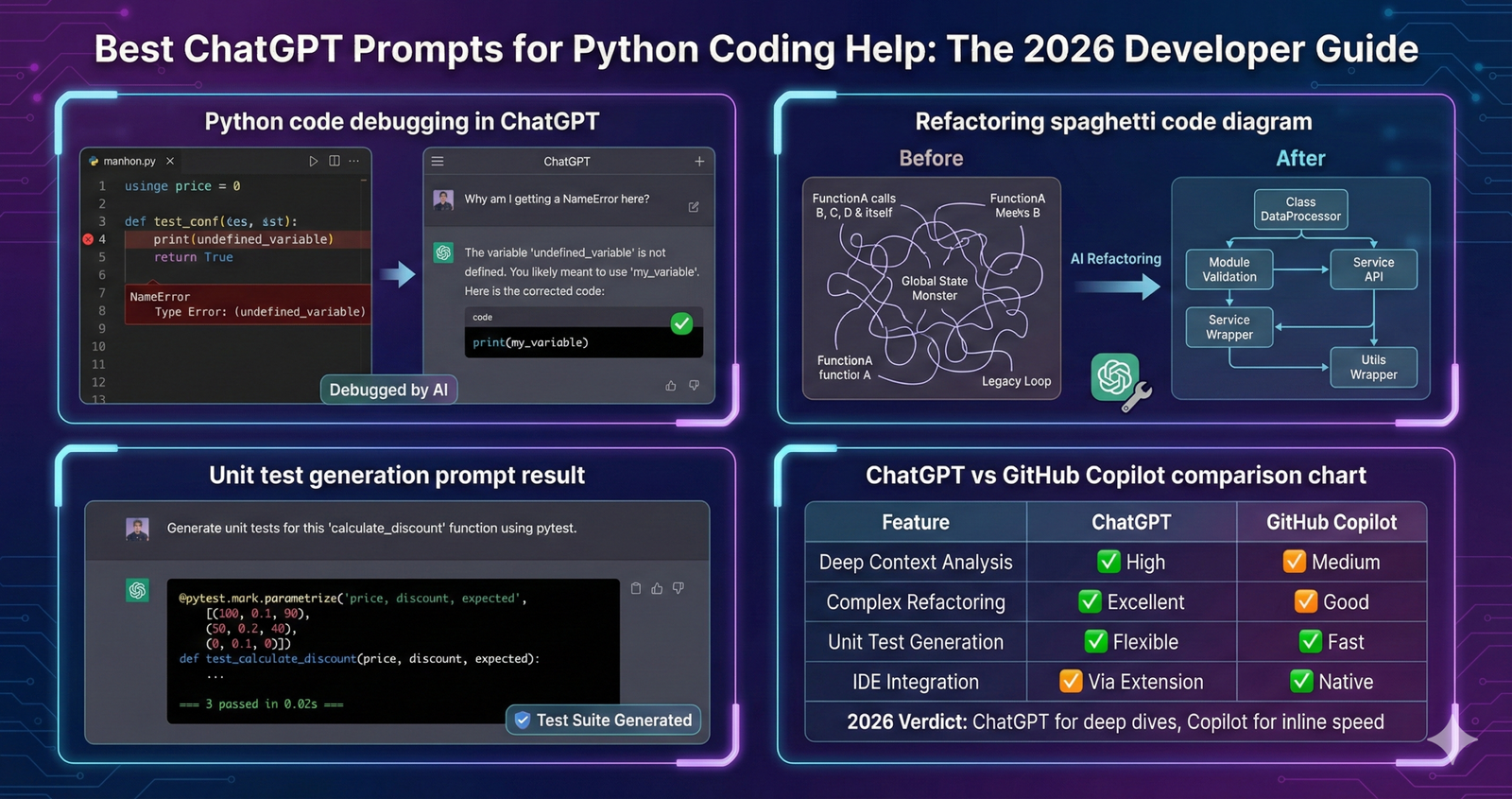
Debugging is where AI shines. But don’t just say “Fix this.”
1. The Logic Analyzer
Use this when the code runs but gives the wrong result.
Copy This Prompt:“I am encountering a logic error in the following Python function. The goal is to [Insert Goal], but the actual output is [Insert Output].Please perform a ‘Rubber Duck Debugging’ session. Walk through my code line-by-line and explain the state of the variables at each step to identify where the logic breaks.[Paste Code Here]”
2. The Error Stack Trace Solver
Copy This Prompt:“Here is a Python Traceback Error I received: [Paste Error].Analyze the error and the code snippet below. Do not just fix it; explain why this error occurred and suggesting a defensive coding practice (like try/except blocks) to prevent it in the future.”
Pro Tip: If you are dealing with massive, multi-file projects, ChatGPT might struggle with context limits. In that case, you might be better off using Devin AI, which is designed to debug across an entire repository autonomously.
Phase 3: Code Generation & Scripting
When you need to write fresh code, specificity is your best friend.
1. The “Boilerplate” Generator
Save time on setup.
Copy This Prompt:“Create a Python project structure for a [Web Scraper / Flask API / Data Analysis Tool].Include:
- A standard folder hierarchy.
- A requirements.txt with necessary modern libraries.
- A main.py with a skeleton structure using if __name__ == ‘__main__’:.
- Add type hinting to all function signatures.”
2. The “Library Hunter” Prompt
Don’t reinvent the wheel.
Copy This Prompt:“I need to accomplish [Task, e.g., convert PDF to Audio]. Compare the top 3 Python libraries for this task. List their pros/cons regarding speed, dependency weight, and recent maintenance updates. Recommend the best one for a production environment.”
Phase 4: Refactoring and Optimization
This is what separates juniors from seniors. Make your code clean.
1. The “Spaghetti to Clean Code” Prompt
Copy This Prompt:“Refactor the following Python code to adhere to ‘Clean Code’ principles.
- Break large functions into smaller helper functions.
- Rename variables to be descriptive (no x or data).
- Add docstrings to every function in Google Style format.[Paste Code Here]”
2. The “Big O” Performance Check
Copy This Prompt:“Analyze the time complexity (Big O Notation) of this function. It currently runs too slowly on large datasets. Rewrite it to be more efficient, possibly using itertools or caching via functools.lru_cache.”
For data-heavy refactoring, especially if you are working inside Excel or spreadsheets, you should check how Microsoft Copilot Pro now integrates Python directly into Excel cells for instant optimization.
Phase 5: Unit Testing (TDD)
Writing tests is boring. Let ChatGPT do it.
The “Pytest” Generator
Copy This Prompt:“Write a comprehensive pytest suite for the following class.Include:
- Happy path tests (valid inputs).
- Edge case tests (empty lists, None values, negative numbers).
- Mocking for any external API calls using unittest.mock.[Paste Class Code]”
Why this matters: Security. Robust tests prevent your app from crashing when users do unexpected things.
Phase 6: Learning and Explanation
Sometimes you don’t want the code; you want to understand it.
The “Explain Like I’m Five” (ELI5)
Copy This Prompt:“I am trying to understand [Complex Concept, e.g., Python Decorators or Asyncio]. Explain it to me using a real-world analogy (not code jargon). Then, show me a ‘Before and After’ code example of how it improves a script.”
This is where the reasoning capabilities of models like Google Gemini vs ChatGPT-4o come into play. GPT-4o is generally better at the nuanced analogies, while Gemini is excellent for pulling updated documentation references.
Phase 7: Documentation and Commenting
Bad documentation kills projects.
The “Auto-Doc” Prompt
Copy This Prompt:“Generate a Markdown (README.md) file for this script.Include:
- Installation instructions (pip install).
- Usage examples with code blocks.
- A table explaining the configuration parameters.[Paste Code]”
Comparison: ChatGPT vs. The Rest
Should you use ChatGPT for everything? Not necessarily.
| Task | Recommended Tool | Why? |
| Logic & Algorithms | ChatGPT-4o | Best reasoning capabilities. |
| Full Repo Debugging | Devin AI | Can read multiple files at once. |
| IDE Autocomplete | GitHub Copilot | Integrated directly into VS Code. |
| Large Doc Analysis | Google Gemini | 1M+ token window for huge logs. |
Conclusion: The “Pair Programmer” Mindset
The best developers in 2026 don’t copy-paste blindly. They treat ChatGPT as a junior developer who types fast but needs supervision.
By using these ChatGPT prompts for Python coding help, you move from “generating text” to “architecting solutions.” You save the brainpower for the hard stuff—system design and problem-solving—while the AI handles the syntax.
Stay updated on the next generation of reasoning models that will make these prompts even more powerful by following our ChatGPT-5 rumors and release date news.
Frequently Asked Questions (FAQs)
1. Can ChatGPT write secure Python code?
ChatGPT is helpful, but it is not a security expert. It often suggests using standard libraries that might have vulnerabilities if not configured correctly. Always use the “Senior Architect” persona prompt to enforce security best practices, and audit the code for things like SQL injection or exposed secrets.
2. Is ChatGPT better than Stack Overflow?
For specific, context-heavy problems (“Why is my variable returning None?”), ChatGPT is often faster because it reads your specific code. For general best practices or obscure library errors, Stack Overflow is still superior due to community vetting.
3. Can ChatGPT handle Python 3.12+ features?
Yes, GPT-4o is trained on data that includes modern Python features. However, you should explicitly ask it to use “Modern Python features” in your prompt, otherwise, it might default to older, more common syntax styles found in its training data.
4. How do I get ChatGPT to write long scripts without stopping?
ChatGPT has an output token limit. If the code cuts off, simply type “Continue” or “Finish the code.” Alternatively, ask for the code in functional blocks (e.g., “Write the database connection class first”) to ensure quality isn’t lost in a long response.
5. Can I use ChatGPT to convert Python to other languages?
Absolutely. You can paste a Python script and ask: “Convert this logic to JavaScript/Node.js, maintaining the same variable naming conventions.” This is excellent for full-stack developers.
6. Does ChatGPT know about my private API keys?
Never paste real API keys or passwords into ChatGPT. Although OpenAI has privacy features, it is a bad security habit. Use placeholders like API_KEY = “YOUR_KEY_HERE” when prompting.
7. Why does the code sometimes not work?
AI can “hallucinate” functions that don’t exist, especially in lesser-known libraries. Always ask it to “Verify that this method exists in the current version of the library” or cross-reference with official documentation.